Chapter 3A
Simple Decision Prompts
 Workshop (AI Extensions) - Simple Decision Prompts
Decision Intelligence concepts applied in this module:
- Listing generic decision-making tools trained-into Generative AI LLMs
- Creating custom AI personas with a system decision prompt
- Generating decision outputs using easier to consume formats (Markdown)
Prompts are the fundamental building blocks for eliciting effective responses from AI models. This module demonstrates how to use common prompt engineering techniques within Microsoft AI Extensions. If you’ve used ChatGPT or Microsoft Copilot, you’re already familiar with prompting: given an instruction, a language model predicts the most likely and relevant response. With Microsoft AI Extensions, you can build applications, services, and APIs that execute these prompts quickly and effectively.
For more information on using prompts with Microsoft Extensions AI, visit: https://learn.microsoft.com/en-us/dotnet/ai/quickstarts/prompt-model?pivots=azure-openai
The process of carefully crafting questions or instructions for AI is called Prompt Engineering. Prompt Engineering involves designing and refining input prompts—text or questions—so that the AI produces responses that are more relevant, useful, or accurate. The goal is to maximize the quality and clarity of the AI’s output, often by using specific wording, added context, or concrete examples within the prompt.
📝 Note: Future modules will evolve the prompts to include Context Engineering, which is a more broader technique that includes setting up an information architecture (memory, exeternal data, system prompts, MCP Tools etc.) for making better decisions.
By combining Decision Intelligence with Prompt Engineering/Context Engineering, you can create “Decision Intelligence powered by Generative AI”. This approach leverages Generative AI models to apply decision-making pricingples, by reasoning through complex decision scenarios, gathering intelligence, recommending decisions, and communicating results more effectively.
Step 1 - Initialize Configuration Builder & Build the AI Orchestration
Execute the next two cells to:
- Use the Configuration Builder to load the API secrets.
- Use the API configuration to build the AI orchestrator.
// Import the required NuGet configuration packages
#r "nuget: Microsoft.Extensions.Configuration, 10.0.10"
#r "nuget: Microsoft.Extensions.Configuration.Json, 10.0.10"
#r "nuget: System.Text.Json, 10.0.10"

using Microsoft.Extensions.Configuration.Json;
using Microsoft.Extensions.Configuration;
using System.IO;

// Load the configuration settings from the local.settings.json and secrets.settings.json files
// The secrets.settings.json file is used to store sensitive information such as API keys
var configurationBuilder = new ConfigurationBuilder()
    .SetBasePath(Directory.GetCurrentDirectory())
    .AddJsonFile("local.settings.json", optional: true, reloadOnChange: true)
    .AddJsonFile("secrets.settings.json", optional: true, reloadOnChange: true);
var config = configurationBuilder.Build();

// IMPORTANT: You ONLY NEED either Azure OpenAI or OpenAI connection info, not both.
// Azure OpenAI Connection Info
var azureOpenAIEndpoint = config["AzureOpenAI:Endpoint"];
var azureOpenAIAPIKey = config["AzureOpenAI:APIKey"];
var azureOpenAIModelDeploymentName = config["AzureOpenAI:ModelDeploymentName"];
// OpenAI Connection Info
var openAIAPIKey = config["OpenAI:APIKey"];
var openAIModelId = config["OpenAI:ModelId"];
// AzureOpenAI or OpenAI selection flag
var useAzureOpenAI = bool.Parse(config["AzureOpenAI:UseAzureOpenAI"] ?? "true");

// Console.WriteLine(azureOpenAIEndpoint);
// Console.WriteLine(azureOpenAIModelDeploymentName);
// Import the Microdoft Extensions AI NuGet Packages
#r "nuget: Microsoft.Extensions.AI, 10.8.3"
#r "nuget: Microsoft.Extensions.AI.Abstractions, 10.8.3"
#r "nuget: Microsoft.Extensions.AI.OpenAI, 10.8.3"
// Import Azure & OpenAI NuGet Packages
#r "nuget: Azure.Identity, 1.21.0"
#r "nuget: OpenAI, 2.12.0"

using Azure;
using Microsoft.Extensions.AI;
using Microsoft.Extensions.Configuration;
using OpenAI;
using OpenAI.Chat;
using System.ClientModel;
using System.ComponentModel;
using System.Runtime.InteropServices;


// Create the IChatClient based on the selected service
IChatClient chatClient;

// Create a new MEAI ChatClient instance
if (useAzureOpenAI)
{
    Console.WriteLine("Using Azure OpenAI Service");

    var apiKeyCredential = new ApiKeyCredential(azureOpenAIAPIKey!);

    var azureOpenAIClient = new OpenAIClient(
        apiKeyCredential,
        new OpenAIClientOptions
        {
            Endpoint = new Uri($"{azureOpenAIEndpoint!.TrimEnd('/')}/openai/v1")
        });

    chatClient = azureOpenAIClient.GetChatClient(azureOpenAIModelDeploymentName).AsIChatClient();
}
else
{
    Console.WriteLine("Using OpenAI Service");

    var apiKeyCredential = new ApiKeyCredential(azureOpenAIAPIKey);
    var openAIClient = new OpenAIClient(apiKeyCredential);

    // #pragma warning disable OPENAI001
    chatClient = openAIClient.GetChatClient(openAIModelId).AsIChatClient();
}
Step 2 - Execute a Decision Prompt
Many LLMs and even SLMs have been trained on knowledge that includes decision frameworks & processes. This makes LLMs great decision assistants, which can:
- Provide proper Decision Frames
- Gather Intelligence (information) in order to make a decision
- Recommend Decision Frameworks to make a high-quality decision
- Provide feedback to evaluate a Decision
Once the chat client instance is instantiated, it is ready to intake prompt instructions. In the prompt below, the chat client object is instructed to provide examples of decision frameworks "trained into" the knowledge of the configured AI model.
using System.Text.Json;

// A simple Decision Intelligence prompt to help with describing decision-making frameworks
var simpleDecisionPrompt = """
Identify and list 5 decision-making frameworks that can enhance the quality of decisions.
Briefly describe how each decision-making framework supports better analysis and reasoning in various scenarios.
""";

// Execute the prompt against the AI model
var simplePromptResponse = await chatClient.GetResponseAsync(simpleDecisionPrompt);
var responseString = simplePromptResponse.Text;

// Display the response from the AI model
Console.WriteLine(responseString);
Step 3 - Execute a Decision Prompt with Streaming
Microsoft AI Extensions chat clients support response streaming when invoking the prompt. This allows responses to be streamed to the console as soon as they are made available by the LLM and service. Below the same decision prompt executed in Step 2 is used. However, notice that chunks are streamed and can be read by the user as soon as they are available.
📝 Note: An average human can read between 25-40 Tokens / second. Therefore, while streaming certainly helps with providing AI output to the user, it begins to lose its effectiveness at large token velocity. Furthermore, while streaming certainly shows a responsive system, it does lose its effectiveness when the AI system needs to perform long processing.
// Same Decision Intelligence prompt executed using Streaming output chunks
await foreach (var streamChunk in chatClient.GetStreamingResponseAsync(simpleDecisionPrompt))
{
   Console.Write(streamChunk);
}
Step 4 - Execute a Decision Prompt with Improved Output Formatting
Generative AI models have an inherent ability to not only provide decision reasoning analysis, but also format the output in a desired format. This could be as simple as instructing the Generative AI model to format the decision as a single sentence, paragraphs or lists. However more sophisticated output generations can be instructed. For example, the GenAI model can output Markdown or even extract information and fill in a desired schema (JSON). Specifically for Decision Intelligence, you can ask the GenAI models to apply decision communication frameworks to the generation as well.
Execute the simple decision prompt below with Markdown formatting output. This table can now be rendered in a Markdown document for easy human comprehension. Markdown tables and other formats can be used on web sites, document, programming code etc. Even Generative AI models understand Markdown format, which can not only be used for output but inside input prompts.
// A new decision prompt to help with describing decision-making frameworks using table Markdown format
var simpleDecisionPromptWithMarkdownFormat = """
Identify and list 5 decision-making frameworks that can enhance the quality of decisions.
Briefly describe how each decision-making framework supports better analysis and reasoning in various scenarios.

Format the response using only a Markdown table. Only return a Markdown table.
Do not enclose the table in triple backticks.
""";

// Execute the prompt against the AI model
var simplePromptResponseWithMarkdownFormat = await chatClient.GetResponseAsync(simpleDecisionPromptWithMarkdownFormat);
var responseStringWithMarkdownFormat = simplePromptResponseWithMarkdownFormat.Text;

// Display the response string as Markdown
responseStringWithMarkdownFormat.DisplayAs("text/markdown");
Step 5 - Execute a Decision Prompt with a Custom Prompt Execution Configuration
The Microsoft AI clients support the configuration of prompt execution. The typical OpenAI and Azure OpenAI settings are exposed as configuration options that provide a different AI output experience. Non-reasoning models GPT-3.5 through GPT4.1 support settings like Temperature, LogProbs, TopK to optimize returns. Most recently (in the year 2026), most top performing Generative AI models are reasoning models, which simplify the configuration to reasoning effort (Minimal, Low, Medium, High, XHigh) or token thinking budgets. This basically is a reasoning setting that correlates to how many resources the AI models spend "thinking" (internal monologue) before the AI executes the prompt instructions. Some models can also turn off "reasoning" model and expose the classic settings as well.
📝 Note: The supported prompt settings are dependent on the API plus the specific model version. For example, an AI model paired with an older API may not expose all the configuration settings available. Conversely, a new preview model may not have all the settings available until it becomes generally available. Types of model execution (general versus reasoning) will also have different execution setting parameters. Microsoft Azure makes this much easier, by providing a single versionless API layer that handles both GA and preview features (/v1).
Execute the code cell below. Note there is a new ChatOptions object instantiated that specifies how we would like the AI to process the decision intelligence prompt. Note the key change:
- ResponseFormat setting is set to JSON, which will return the response in a structured JSON object. An optional JSON schema can be supplied to enforce output in more specific ways.
Notice the output difference below is formatted with JSON output.
// Declare new chat options setting MaxOutputTokens and ResponseFormat to JSON explicitly
var chatOptions = new ChatOptions
{
    ResponseFormat = Microsoft.Extensions.AI.ChatResponseFormat.Json
};

var simpleDecisionPromptWithJsonFormat = """
Identify and list 5 decision-making frameworks that can enhance the quality of decisions.
Briefly describe how each decision-making framework supports better analysis and reasoning in various scenarios.

Return the response in JSON format.
""";

// Execute the prompt against the AI model, pass in the chat options settings
var simplePromptResponse = await chatClient.GetResponseAsync(simpleDecisionPromptWithJsonFormat, chatOptions);
var responseString = simplePromptResponse.Text;

// Display the response string (JSON)
Console.WriteLine(responseString);
Step 6 - Execute Decision Prompts with a System Prompt (AI Decision Persona)
When building Decision Intelligence prompts, the typical best practices of prompt engineering apply.
This includes the following best practices:
- Make the prompt more specific (i.e. decision intelligence)
- Add desired structure to the output with formatting
- Provide examples with few-shot prompting
- Instruct the AI what to do to avoid doing something else
- Provide context (additional information) to the AI
- Using Roles in Chat Completion API prompts
- Give your AI words of encouragement
- Cleanly dillineate sections in complex prompts
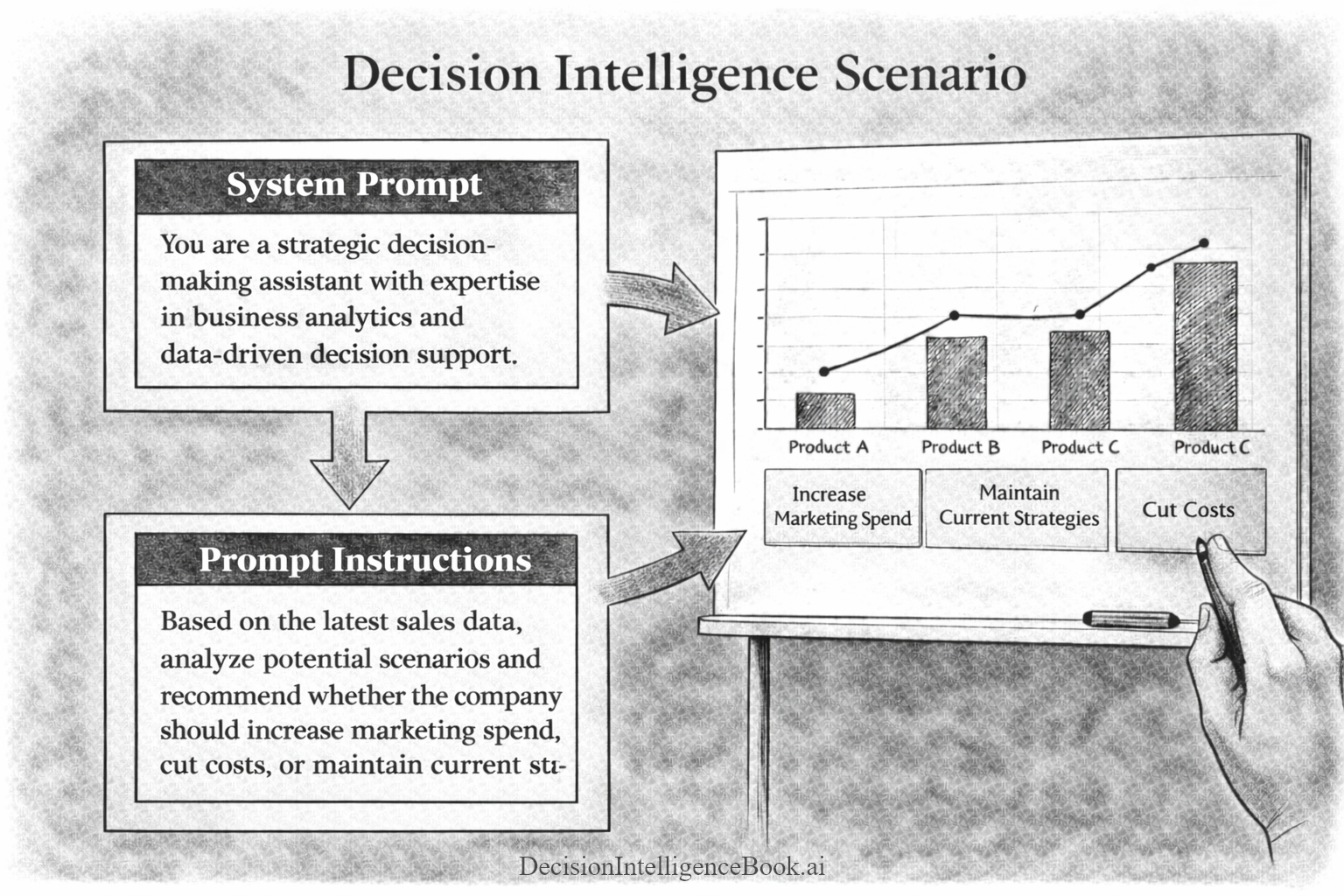
A fundemental prompting best practice is to provide a common behavior across all the LLM interactions in a system prompt. The system prompt is passed in on every single call to the AI model. By passing the same (or similar) system prompt with every prompt gives your Generative AI system a common behavior across all your decision framework needs. This can be thought of as a "persona". Furthermore, this common persona is the foundational building block of building AI agents; where the desired behavior is to have each agent have a unique persona/behavior every time you interact with that agent.
The system prompt concept is illustrated in the visualization of a ficticious Decision Intelligence Scenario. Notice that the general Decision Intelligence guidance/persona is placed in the System Prompt, but the specific instructions are found in the Prompt Instructions section. Both the System Prompt and the Prompt Instructions are sent together to the Generative AI model:
Execute the code cell below with a dynamic system prompt and prompt instructions. In the System Prompt, the following "persona" was codified:
- Management Consulting domain
- Focus on quantitative (work with math, data & numbers) approaches
- Decision Intelligence best practices
- Specific desired Markdown output format
Notice the different behavior of the output for decision frameworks below. Based on the new detailed and more specific system prompt, the decision-making responses are much more aligned for decision-making, quantitative methods.
// Create a System Prompt instruction to override the default system prompt
// Add the System Prompt (Persona) to behave like a Decision Intelligence assistant
var systemPromptForDecisionIntelligence = """
You are a Decision Intelligence Assistant focusing on the management consulting domain.
You prefer working with quantitative solutions for decision-making problems.
Assist the user in exploring options, reasoning through decisions, problem-solving.
Apply systems thinking to the scenarios.
Provide structured, logical, and comprehensive decision advice.

Output Format Instructions:
When generating Markdown, do not use any headings higher than ###.
Avoid # and ## headers. Use only ###, ####, or lower-level headings if necessary.
All top-level section headers should start at ### or lower.
Never use ---, ***, or ___ for horizontal lines. There should be no horizontal lines in the output.
For separation, use extra extra spacing. Do not any render horizontal lines.

Format the response using only a Markdown table. Only return a Markdown table.
Do not enclose the table in triple backticks.
""";

var simpleDecisionPromptInstructions = """
Recommend the top 5 decision frameworks that can be used for daily situations to make various decisions.
These frameworks should be very easy to understand and apply to various scenarios.
""";

// Combine the System Prompt with the Prompt Instructions
var simpleDecisionPromptCombined = $"""
System Prompt:
{systemPromptForDecisionIntelligence}

Specific Instructions:
{simpleDecisionPromptInstructions}
""";

// Execute the prompt against the AI model
var simpleDecisionPromptCombinedResponse = await chatClient.GetResponseAsync(simpleDecisionPromptCombined);
var simpleDecisionPromptCombinedResponseString = simpleDecisionPromptCombinedResponse.Text;

// Display the response string as Markdown
simpleDecisionPromptCombinedResponseString.DisplayAs("text/markdown");
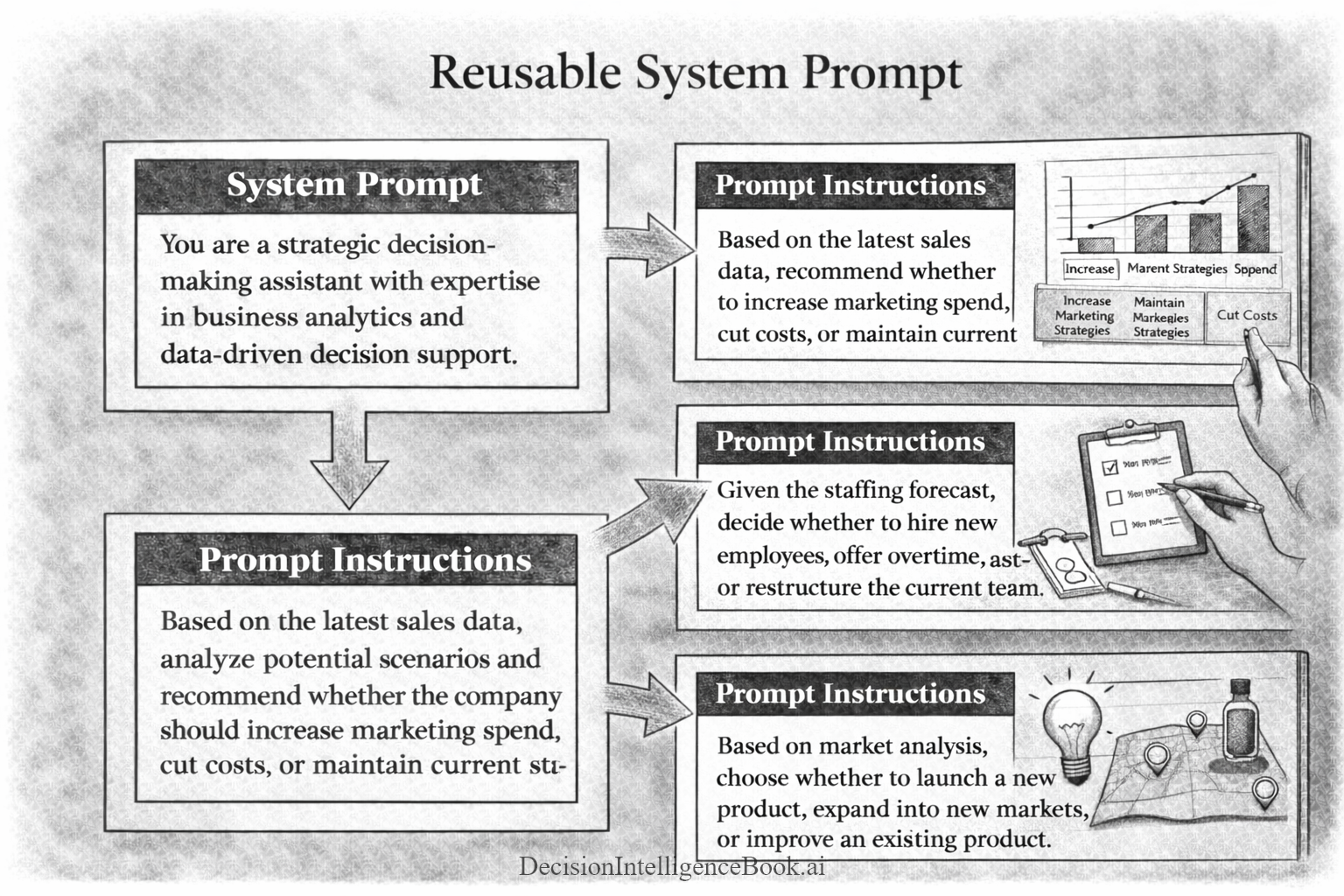
The core idea of a system prompt is to group all of common decision processes, tasks, formats, decision approaches and place all of those things into the system prompt that can be re-used many times for your prompt instructions & agentic subsequent calls. This is illustrated below, where the same System Prompt is re-used several times for various decision scenarios:
Step 7 - Execute a Decision Scenario with a System Prompt (Custom AI Persona)
In this step a decision scenario will be introduced requiring analysis and a recommendation performed by Artificial Intelligence. The full Decision Intelligence framework will not be used, rather a simple request for Artificial Intelligence to recommend a path forward (recommendation) for the human user to ultimately make the final decision.
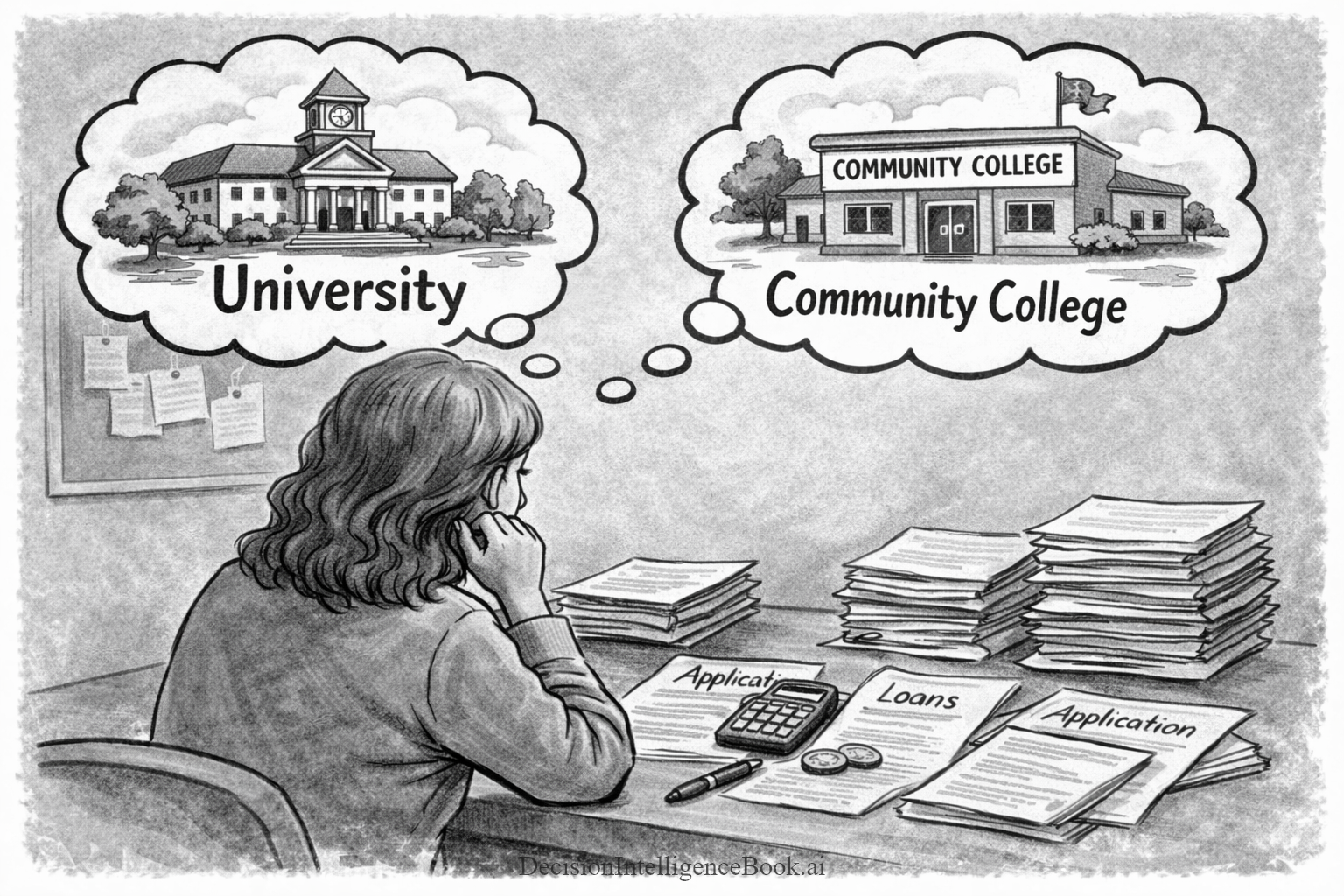
Decision Scenario: Your high school daughter Alex is deciding whether to enroll directly in a four-year university or start at a community college to earn an associate degree first. These are Alex's main decision factors: financial, career uncertainty, academic consistency and future impact. In addition, you have all the decision factor detailed data available to pass to the GenAI model prompt. You are looking for an impartial (non-family) recommendation. Can Artificial Intelligence be that impartial judge to help Alex decide?
// Create a system prompt instruction to override the default system prompt
// Add the System Prompt (Persona) to behave like a decision intelligence assistant
var systemPromptForDecisionScenario = """
You are a Decision Intelligence Assistant.
Assist the user in exploring options, reasoning through decisions, problem-solving.
Apply systems thinking to the scenarios.
Provide structured, logical, and comprehensive decision advice.

Output Format Instructions:
When generating Markdown, do not use any headings higher than ###.
Avoid # and ## headers. Use only ###, ####, or lower-level headings if necessary.
All top-level section headers should start at ### or lower.
Never use ---, ***, or ___ for horizontal lines. There should be no horizontal lines in the output.
For separation, use extra extra spacing. Do not any render horizontal lines.
""";

// Provide a description of the decision scenario and the desired output
// Provide detailed Decision Scenario considerations and information about Alex (the decision-maker)
var collegeScenarioDecisionPrompt = """
Imagine you are advising a daughter named Alex who is deciding whether to enroll directly in a well-regarded four-year
university or start at a community college to earn an associate degree first.

Make a single recommendation based on the following decision factor details.
Output the recommendation in a Markdown table format.

Financial Considerations:
Alex's four-year university will cost significantly more in tuition, housing, and related expenses
(estimated $50,000-$60,000 per year). A two-year associate program at a local community college could
save substantial money (estimated $3,000-$5,000 per year), but Alex may have to transfer to a
four-year institution later to complete a bachelor's degree. The family can afford the four-year university,
with some loans, but the cost is only a medium concern.

Career and Major Uncertainty:
Alex is not entirely sure what she wants to major in. She is torn between business, psychology, and
possibly something in the arts. She worries that if she starts at the four-year university,
she might switch majors and incur extra time and cost. On the other hand,
community college might give her space to explore options,
but transferring could mean adjusting to a new campus and curriculum midway through.

Academic Consistency and Networking:
Going straight to the four-year university would allow Alex to build early relationships with professors,
join campus groups, and potentially secure internships or research opportunities. Starting at community college might
delay those opportunities, but it could also let her explore different fields at a lower cost.
She might miss out on the “full campus” experience early on, but transferring later means she could
still build connections, just on a different timeline.

Future Impact:
Alex is unsure of the short-term future impact of her decision that might be hard to remediate.
Alex wants a solid professional network and relevant experience when she graduates.
Alex is not overly concerned about the social aspect of college,
but feels she can build a quality network in a four-year university setting sooner.
She is also concerned about taking on significant student loan debt. The decision affects not only her immediate academic path but
also her long-term financial stability and career prospects.
""";

// How the prompt looks like to the LLM
var collegeScenarioDecisionPromptCombined = $"""
System Prompt:
{systemPromptForDecisionScenario}

Request from the user:
{collegeScenarioDecisionPrompt}
""";

// Execute the prompt against the AI model
var collegeScenarioDecisionPromptCombinedResponse = await chatClient.GetResponseAsync(collegeScenarioDecisionPromptCombined);
var collegeScenarioDecisionPromptCombinedResponseString = collegeScenarioDecisionPromptCombinedResponse.Text;

// Display the response string as Markdown
collegeScenarioDecisionPromptCombinedResponseString.DisplayAs("text/markdown");